React
React is a JavaScript library for building user interfaces. It uses a component-based architecture where you build complex UIs from small, isolated pieces of code called "components", following a declarative approach.
React is the most widely used frontend library, with a large ecosystem and strong community. It is used by Meta, Vercel, Airbnb, and many more.
Core Concepts
JSX
JSX is a syntax extension to JavaScript that looks like HTML but has the full power of JavaScript. It makes it easier to write and read UI code in React. JSX produces React "elements" that describe what should appear on screen.
// Static element
const element = <h1>Hello, world!</h1>

// JavaScript expressions inside curly braces
const name = 'John Doe'
const greeting = <h1>Hello, {name}</h1>

// Event listeners
const Example = () => (
  <button onClick={() => alert('Hello world')}>Click me</button>
)
Components
Components are the building blocks of React applications — reusable pieces of code that return React elements. Always use function components (class components are legacy and should be avoided).
const Greeting = () => {
  return <div>Hello!</div>
}

// With implicit return
const Greeting = () => <div>Hello!</div>
Props
Props are how components receive data from their parents. They are passed as attributes and follow a one-way data flow — a child can read its props but never modify them.
type GreetingProps = {
  name: string
}

const Greeting = ({ name }: GreetingProps) => {
  return <div>Hello {name}</div>
}

const App = () => {
  return <Greeting name="John" />
}
All React components must act like pure functions with respect to their props.
State
State holds data that may change over the lifetime of a component. When state is updated, React re-renders the component and its children to reflect the new data.
You declare state using the useState hook, which returns the current value and a setter function:
const Counter = () => {
  const [count, setCount] = useState(0)

  return (
    <div>
      <p>You clicked {count} times</p>
      <button onClick={() => setCount(count + 1)}>Click me</button>
    </div>
  )
}
Hooks
Hooks are functions that let you use React features (state, side effects, context, etc.) from function components. The two most fundamental hooks are:
useState— declares a state variable (seen above).useEffect— runs side effects (data fetching, subscriptions, DOM manipulation) after render. It takes a callback and a dependency array that controls when it re-runs.
const Example = () => {
  const [count, setCount] = useState(0)

  useEffect(() => {
    // Runs when `count` changes
    document.title = `You clicked ${count} times`

    return () => {
      // Cleanup: runs before the next effect or when the component unmounts
      console.log('Cleaning up')
    }
  }, [count])

  return (
    <div>
      <p>You clicked {count} times</p>
      <button onClick={() => setCount(count + 1)}>Click me</button>
    </div>
  )
}
React ships many more built-in hooks (useContext, useRef, useMemo, useCallback, etc.). Read about them in the React Hooks reference.
Virtual DOM
React uses a Virtual DOM (VDom) — a lightweight JavaScript representation of the actual DOM. When state changes, React builds a new VDom tree, diffs it against the previous one, and only applies the minimal set of changes to the real DOM.
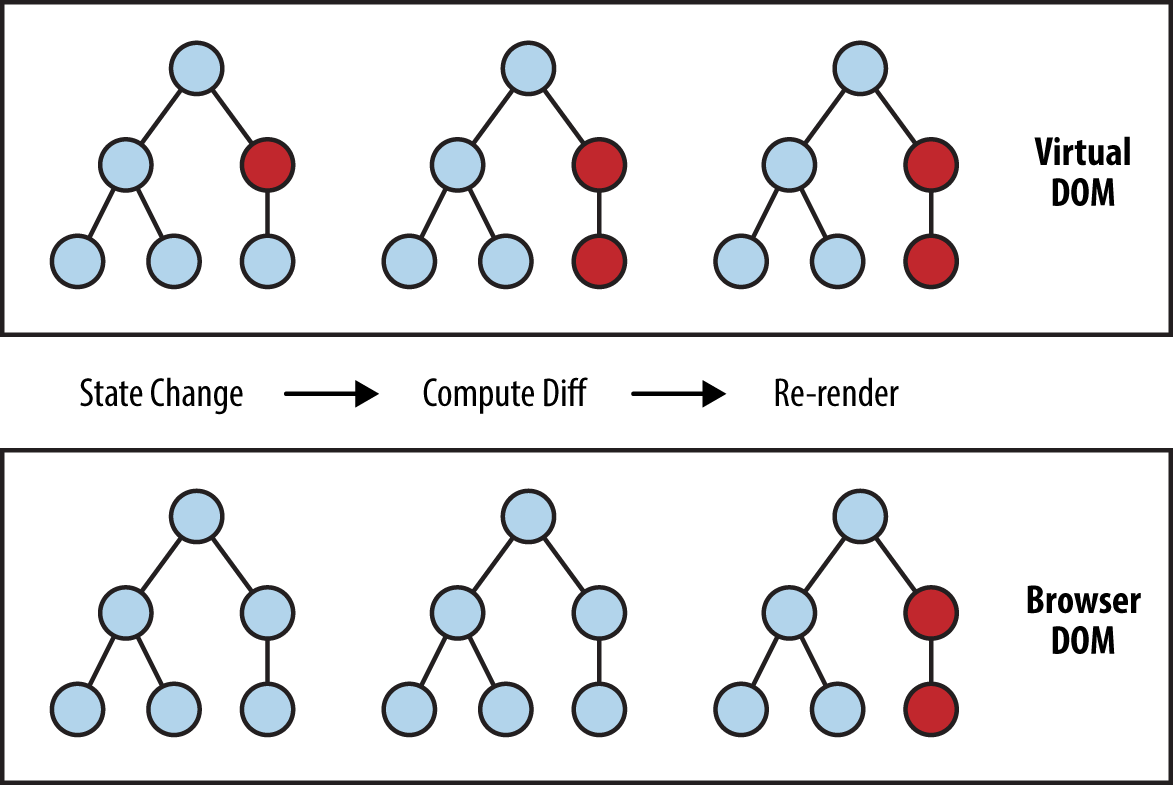
You can learn more about this in this article from Mosh Hamedani.
Resources
- React — Official documentation
- React in 100 seconds
- React Hooks reference
- Thinking in React
- Beginner's TypeScript by Matt Pocock
TanStack Query
When building a React app that talks to an API, you quickly run into challenges: loading states, caching, refetching stale data, optimistic updates, etc. TanStack Query (formerly React Query) handles all of this out of the box.
Key characteristics:
- Automatic caching — query results are cached and shared across components. No need to lift state or use global stores for server data.
- Background refetching — stale data is shown instantly while fresh data is fetched in the background.
- Loading and error states — every query returns
isLoading,isError, anddata, making it trivial to handle UI states. - Mutations —
useMutationhandles create/update/delete operations with built-in support for optimistic updates and cache invalidation.
Quick example:
import { useQuery, useMutation, useQueryClient } from '@tanstack/react-query'

// Fetching data
const ItemList = () => {
  const { data: items, isLoading } = useQuery({
    queryKey: ['items'],
    queryFn: () => fetch('/api/items').then((res) => res.json()),
  })

  if (isLoading) return <p>Loading...</p>

  return (
    <ul>
      {items.map((item) => (
        <li key={item.id}>{item.name}</li>
      ))}
    </ul>
  )
}

// Creating data
const AddItemForm = () => {
  const queryClient = useQueryClient()

  const mutation = useMutation({
    mutationFn: (newItem: { name: string }) =>
      fetch('/api/items', {
        method: 'POST',
        headers: { 'Content-Type': 'application/json' },
        body: JSON.stringify(newItem),
      }),
    onSuccess: () => {
      // Refetch the items list after a successful creation
      queryClient.invalidateQueries({ queryKey: ['items'] })
    },
  })

  const handleSubmit = (e: React.FormEvent<HTMLFormElement>) => {
    e.preventDefault()
    const formData = new FormData(e.currentTarget)
    mutation.mutate({ name: formData.get('name') as string })
  }

  return (
    <form onSubmit={handleSubmit}>
      <input name="name" placeholder="Item name" required />
      <button type="submit" disabled={mutation.isPending}>
        {mutation.isPending ? 'Adding...' : 'Add Item'}
      </button>
    </form>
  )
}
Resources
Exercise — Wishlist Frontend
After creating the REST API, let's build a React application to consume it. The app should let users view, add, edit, and delete wishlist items.
Steps to get started:
- Scaffold a new React project with Vite:
bun create vite wishlist-client --template react-ts. - Install TanStack Query:
bun add @tanstack/react-query. - Set up a
QueryClientProviderat the root of your app (see the quick start guide). - Create a component that lists all items using
useQueryto fetch fromGET /api/items. - Create a form component that adds a new item using
useMutationand invalidates the items query on success. - Add edit and delete functionality for each item.
- Handle loading and error states in all views.